
Introh2
In this post I am not only going to explain how the challenge is solved, but also how it was developed, what vulnerabilities were implemented and how unintended solutions were avoided with some “anticheat” methods. If you just want to see the solution you can go straight to the Writeup.
Being part of the organization for the HackOn 2026 CTF, with the idea of creating fun challenges that also teach something new, I decided to create a GamePWN challenge. I spent days doing HackTheBox challenges and CTFs (specially DEFCON) to get some inspiration and create something that wasn’t just “typical”
The common vectors I found in the different challenges I looked at were:
- Local memory manipulation and client-server communications.
- Source code modification (patching).
- Reversing the code (sometimes obfuscated) to find logic bugs.
- Exploitation of common C/C++ vulnerabilities like overflows.
The Ideah2
The main idea was to create a challenge that plays with the lore of TheGrue, a monster that only appears in the dark, so the goal was to play around with the map lighting. After giving it some thought, the following path was designed for the player:
- They had to find money around the map.
- They had to buy a flashlight in a vending machine.
- With the flashlight turned on, they would enter the secret room which was totally dark and find the flag.
The main problem was that the money found on the map wasn’t enough to buy the flashlight. Here is where the challenge logic came in, you had to get
the flashlight somehow to be able to enter the secret room, because if not TheGrue would eat you.

Developmenth2
The challenge was developed with Unity 2021.3.45f2, the source code and the game can be found in this repo.
The intended vulnerability was simple, the program would have a bad implementation in the vending machine function, first it would check if the player had enough money to buy their selected item and if so, the item with the specific article ID would be assigned to their inventory. However, you could modify the ID value right after the money check and before assigning the item to the inventory.
public void BuyInput() //This is the basic functionality without anticheats{ Item itemToGive = ItemDatabase.Instance.GetItem(selectedItemID); if (itemToGive.price <= MoneyManager.Instance.GetMoney()) { GameLogger.Instance.Log($"Dispensed: {itemToGive.itemName}"); InventorySystem.Instance.AddItem(itemToGive); MoneyManager.Instance.RemoveMoney(itemToGive.price); } else { GameLogger.Instance.Log("Not enough money."); }}The next thing was developing the triggers so that if the player entered the secret room without a flashlight they would lose and all the extra functionalities of the game like the map lighting, objects, etc. Since this is not a Unity tutorial, I won’t explain how they were implemented, but you can see it in the repo.
Once everything was implemented, unintended solutions were tested and the source code was fixed with several anticheat methods like these ones:
- ObfuscateInt: We encrypt the value of important variables like the player’s money, so they cannot be found easily by searching in memory.
public struct ObfuscatedInt{    private int _hiddenValue;    private int _key;    private bool _initialized;
    public int Value{        get{            if (!_initialized){                Initialize(0);            }            return _hiddenValue ^ _key;        }        set{            if (!_initialized){                _key = Random.Range(100000, 999999);                _initialized = true;            }            _hiddenValue = value ^ _key;        }    }
private void Initialize(int initialValue){ _key = Random.Range(100000, 999999); _initialized = true; Value = initialValue; }}-
IntegrityManager: Measures to prevent the source code from being modified. For example, calculating the program hash and checking it at runtime.
-
AssertToken: To me, one of the most important ones, you could spoof that you had the flashlight without having bought it or disable the thegrue trigger so it doesn’t get you when entering without a flashlight. When you bought the flashlight a unique token was generated, which was used to check that the player at least interacted with the machine and went through the expected path.
public void BuyInput(){    if (_transactionPrice == 0)    {        GameLogger.Instance.Log("Select a product prior to purchasing.");        return;    }    long token = MoneyManager.Instance.ProcessTransactionMetrics(_transactionPrice);    if (token != 0)    {        Item itemToGive = ItemDatabase.Instance.GetItem(selectedItemID);        if (itemToGive != null)        {            if (InventorySystem.Instance.AddItemWithMetrics(itemToGive, _transactionPrice, token))            {                GameLogger.Instance.Log($"Dispensed: {itemToGive.itemName}");
_transactionPrice = 0; selectedItemID = 0; } else { GameLogger.Instance.Log("Payment failed."); } } else { Debug.LogError($"Invalid Item ID in memory: {selectedItemID}"); } } else { GameLogger.Instance.Log("Not enough money!"); }}-
Flag obfuscation and loading it in memory: Basic measure to prevent them from finding the flag by searching in memory.
-
Compiling to IL2CPP: This way we avoid giving the code in Assembly-CSharp.dll making it harder to reverse engineer. Using tools like IL2CPDumper.
Writeuph2
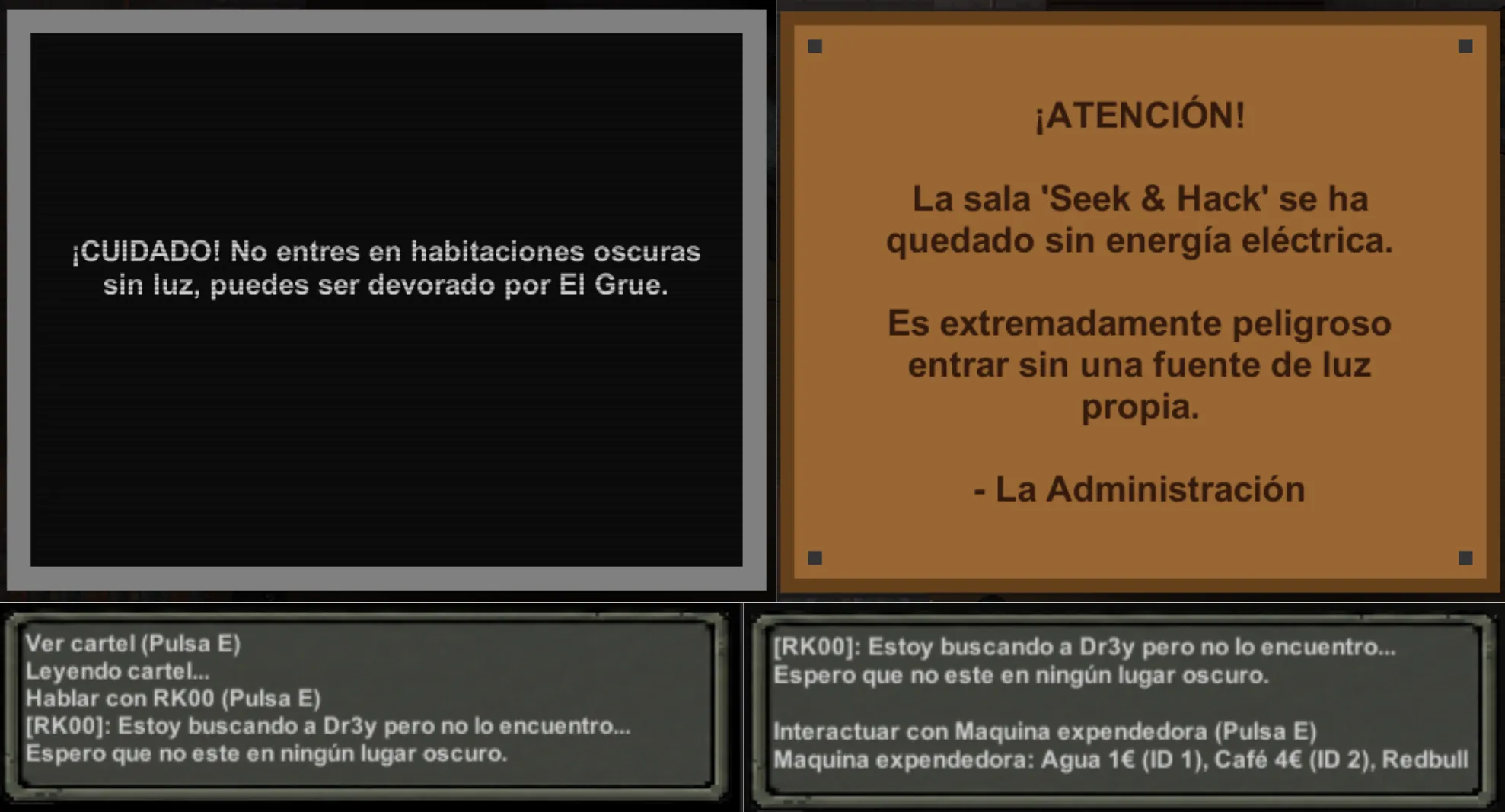
The first thing is to explore the map, we’ll find several clues and dialogs that will tell us what we should do.
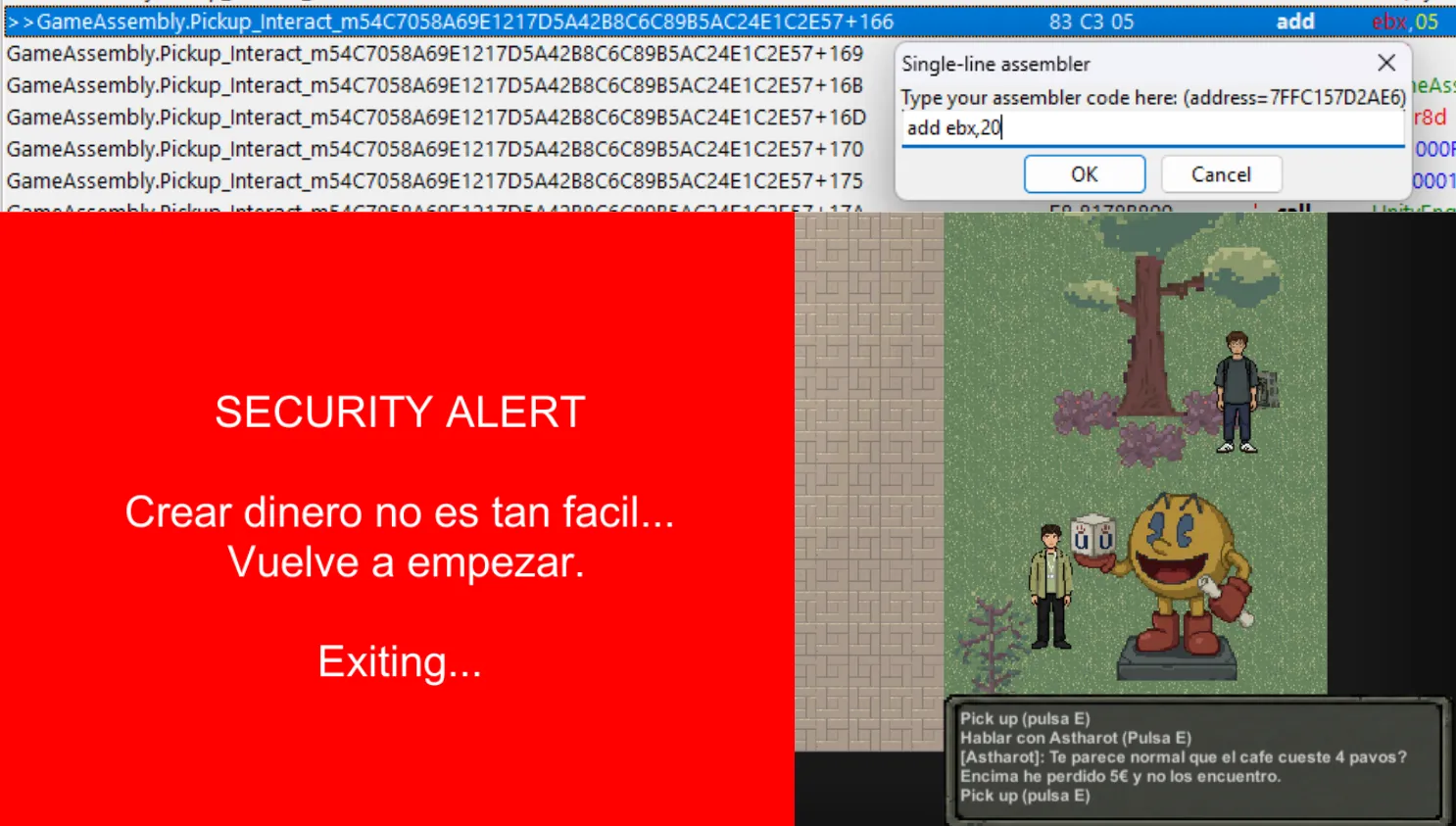
If we explore outside we will find the NPC Astharot who has lost 5€, we’ll find them next to a tree and when picking them up 5 will be added to our money,
the problem is that the flashlight costs 7€, if we try to modify the money value debugging the game with Cheat Engine we’ll see that the integrityManager catches us.
There are two possible solutions, the first one is to try installing Unity Explorer, for example, with MelonLoader a very useful tool for these kinds of challenges, the problem we find if we go to its repo, is that the version is not compatible with our Unity version and the Unity Explorer mod doesn’t load.
If we dig around a bit, there’s a Unity Explorer fork updated that is indeed compatible with our Unity version.
Installing it is easy, you install melonLoader in your game and copy the zipped folders from Unity Explorer to the game folder. When you enter the game if the Unity Explorer menu doesn’t show up press F7
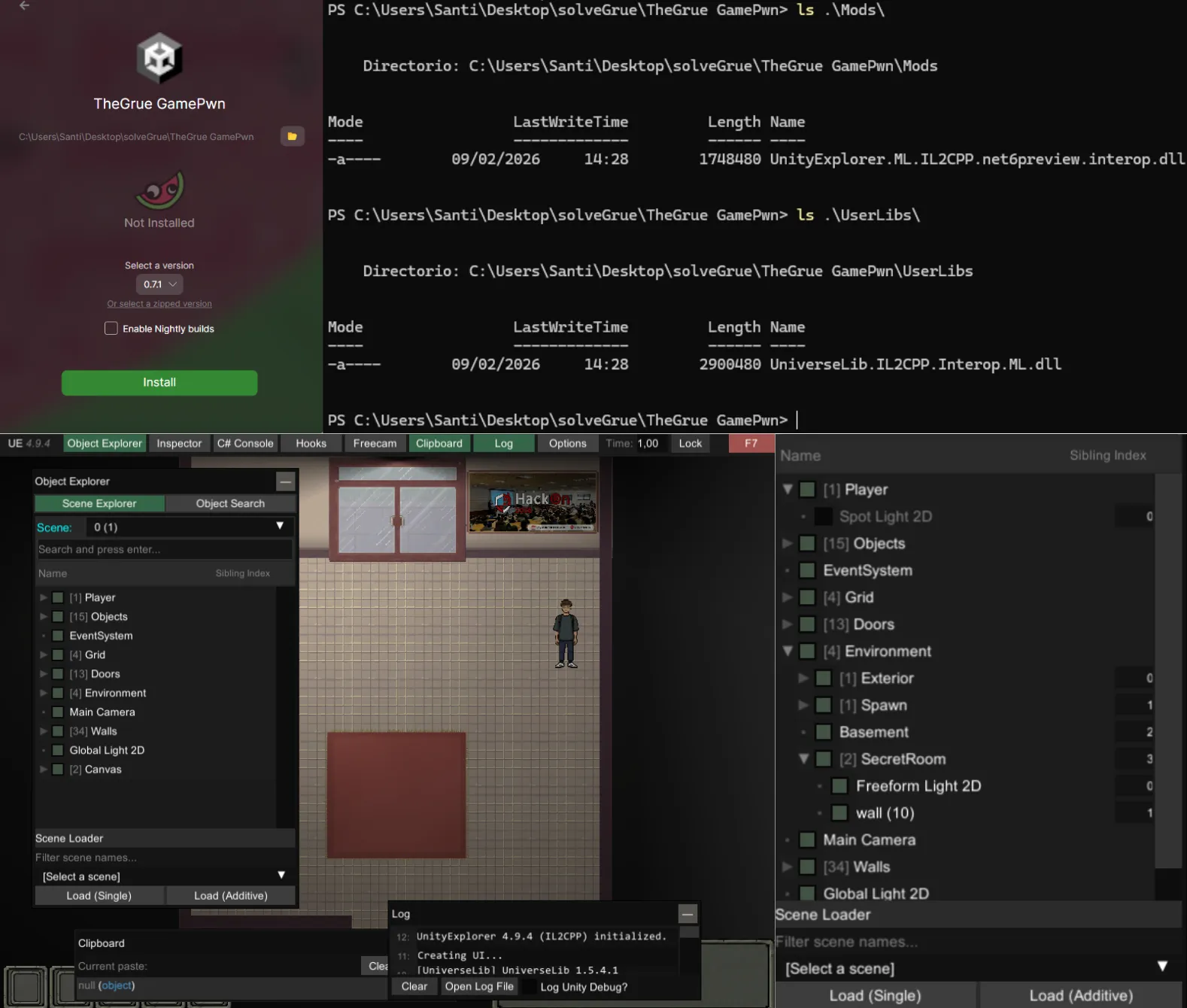
I’d recommend playing around a bit with the mod since it is pretty powerful. For example, we can modify the game logic, move objects around the map, hook functions, we can even activate the player’s flashlight without having bought it, although it’s not the correct solution because we’d need the transaction token so the integrityManager doesn’t get us.
With the help of Cheat Engine and Unity Explorer we can find the different functions the game has, the one we care about is BuyInput which is in charge of buying the items.
Unity Explorer Solutionh3
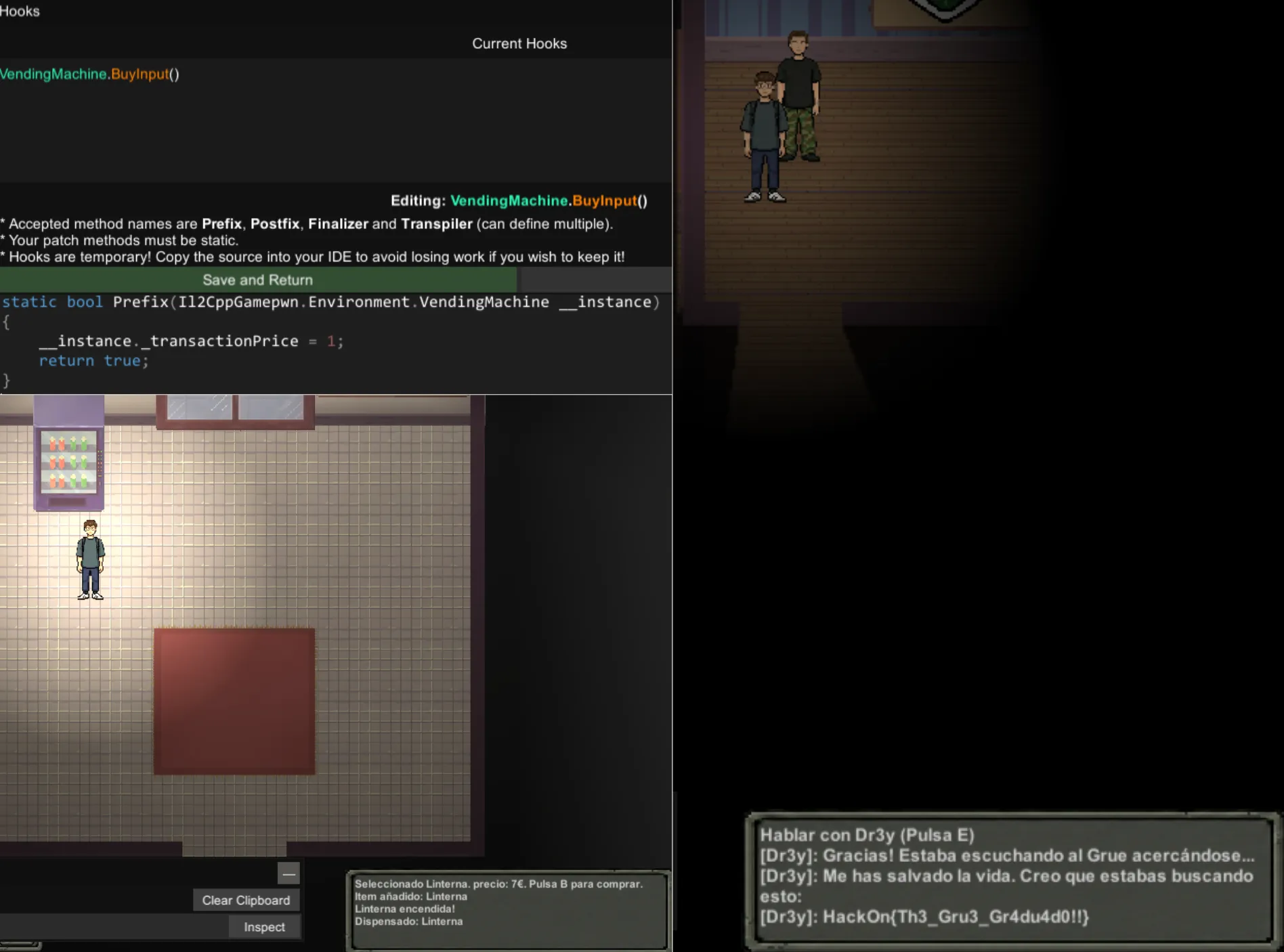
In my opinion, the easiest way, Unity Explorer allows us to use Harmony to inject code inside the normal flow of the game. A hook is the code we are going to execute before or after (prefix or postfix) the game does its logic. In this case it is ideal to change variables like the price before the game reads them. So, we need a Prefix hook on the __instance itself (which gives us access to its variables in memory) and modify the price to a value that suits us better.
static bool Prefix(Il2CppGamepwn.Environment.VendingMachine __instance){ // We can see this variable in the Unity Explorer inspector __instance._transactionPrice = 1; return true;}With the hook made, we go to the machine and buy the flashlight.
Cheat Engine Solutionh3
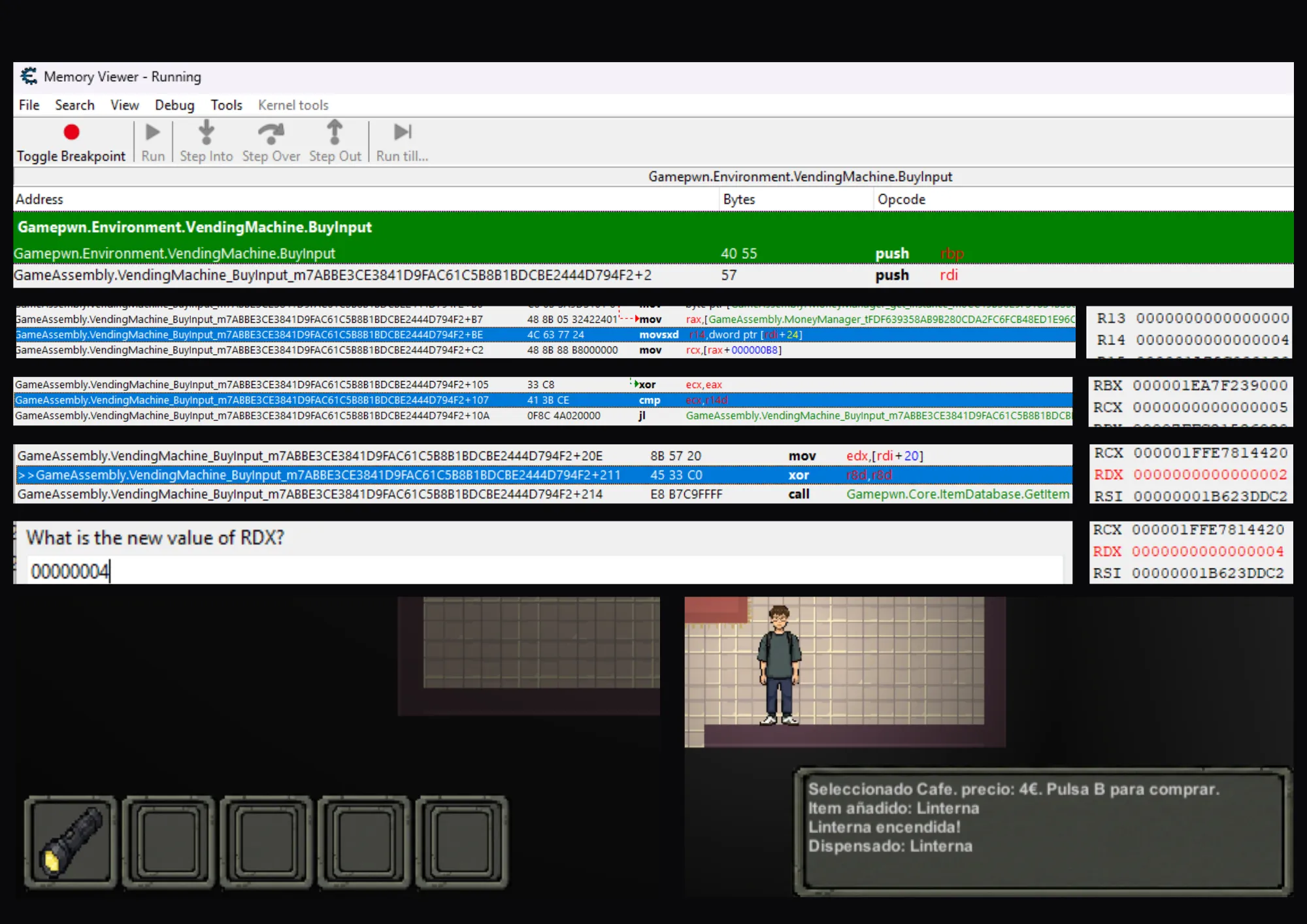
More work-heavy solution but totally valid if you like to read assembly, with the cheat engine disassembly we can find the BuyInput function and modify some values before the logic of the game is executed by adding breakpoints. If we analyze this code we see the following (I simplified the code so it is easier to read):
- In +B7 it loads the MoneyManager class and in +BE it stores in R14 the price of the item we want to buy.
VendingMachine_BuyInput+B7 - mov rax,[MoneyManager]VendingMachine_BuyInput+BE - movsxd r14,dword ptr [rdi+24]- Since the money is an obfuscateInt it can’t be easily found, but if we follow the code flow we see that from +FF it prepares the money subtraction and saves the current money in RCX.
VendingMachine_BuyInput+FF - mov eax,[rbp-14]VendingMachine_BuyInput+102 - mov ecx,[rbp-18]VendingMachine_BuyInput+105 - xor ecx,eaxVendingMachine_BuyInput+107 - cmp ecx,r14d- The next thing is the most important one, after accepting the purchase, the game, after subtracting the money in +149, assigns the object ID in +20E and calls the ItemDatabase.GetItem function to give the player the item with the assigned ID. If we modify the RDX register at this moment to ID 4 (flashlight) we can get it because the money check has already been made.
VendingMachine_BuyInput+20E - mov edx,[rdi+20]VendingMachine_BuyInput+211 - xor r8d,r8dVendingMachine_BuyInput+214 - call ItemDatabase.GetItem- Later we can see in the chat that even though we’ve selected the coffee as a purchase, we’ve been given a flashlight.
Useful resources for GamePWNh2
-Unity Explorer: Mod for Unity, doesn’t support current versions.
-MelonLoader: Loader for Unity mods.
-dnSpyEx: (dnspy fork more updated) Disassembler for C#.
-IL2CPDumper: Unity metadata extractor, very useful to get function and variable names.
-BepInEx: Loader for Unity mods, similar to MelonLoader, sometimes it works better.
-Cheat Engine: Useful for debugging the game, analyzing memory and disassembling.
-Frida: it is also a good option for GamePWN